
Payments
Make a payment
Pay your invoice quickly and securely with Zelle, right from your banking app, with no fees. Prefer a card? Pay by card.
ZPay with Zelle®
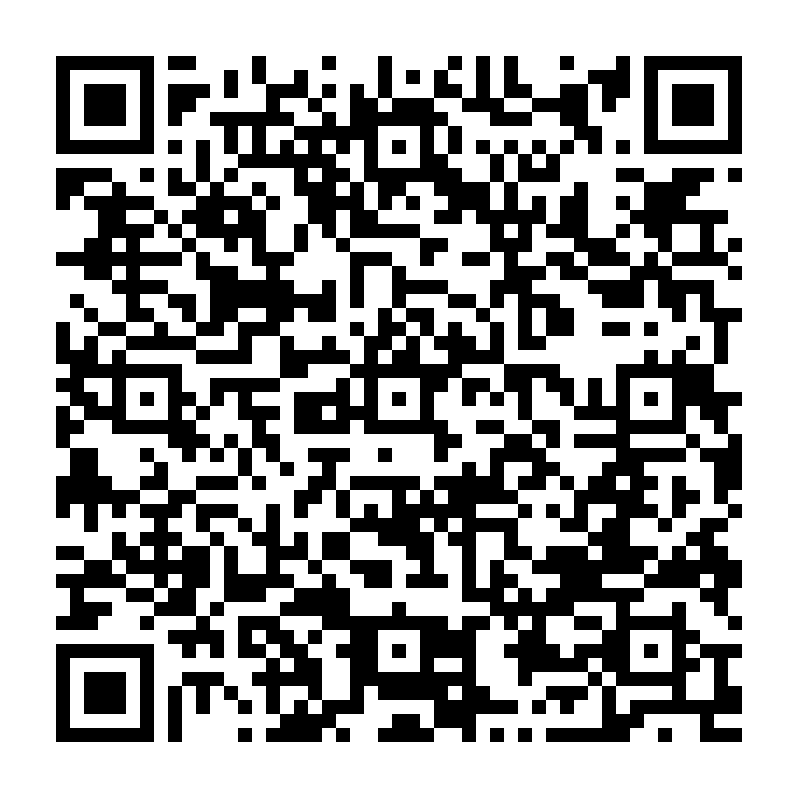 Scan with your phone's camera or banking app
On your phone? You can't scan your own screen. Open your banking app, choose Zelle, then Send, and enter the number below.
Zelle details
Send to (phone number)732-500-5941
NameAmr Tax
Your bank will show: Amr Tax & Accounting Services LLC
MemoYour name + what it's for
e.g. "Maria Lopez – 2025 tax return"
How to pay
- Open your bank's app (Chase, Bank of America, Wells Fargo and most others) and tap Send money with Zelle.
- Scan the QR code, or enter 732-500-5941.
- Check that the name shows Amr Tax & Accounting Services LLC.
- Enter the amount from your invoice, add a memo, and send.
Zelle payments go through in minutes and can't be canceled once sent, so please double-check the name and amount. We'll email you a receipt once it arrives.
Pay by credit or debit card
Prefer a card? You can pay by credit card, debit card or Apple Pay through Chase's secure checkout. You enter your card on Chase's payment page, never on our website.
- Client Portal clients: when your invoice is ready, a Pay by card button appears in your portal under Payments.
- Everyone else: ask us and we'll email or text you a secure Chase payment link for your invoice amount.
We only send card payment links for invoices you're expecting. If you get a payment link you didn't expect, please call us before paying.
Stay safe: AMR Tax & Accounting will never ask you to pay with gift cards, cryptocurrency or wire transfers, and we'll never call you asking for a payment to a different name or number. If something seems off, call us at (732) 500-5941.